
XmlFilter syntax is used in ContentManager and WorkflowTableWatcher.
XmlFilter Syntax-Examples
Percent Sign
The percent sign is a placeholder as soon as the 'Like' statement is set, which is done by Like=”1”. Otherwise, the percent sign is interpreted as a usual character.
Examples:
-
<Field Name="Title" Like="1">%shakira%</Field>
„MyShakirA2001“ would match for this filter.
-
<Field Name="Title" Like="1">%shakira</Field>
„MyShakirA“ would match for this filter, „MyShakirA2001“ would not.
Simple field
<XmlFilter>
    <Field Name="Title">shakira</Field>
</XmlFilter>
Simple field with like
<XmlFilter>
    <Field Name="Title" Like="1">shakira</Field>
</XmlFilter>
Logical trees
<XmlFilter>
    <And>
        <Field Name="Title">shakira</Field>
        <Or>
            <Field Name="Class">Video</Field>
            <Field Name="Class">Audio</Field>
        </Or>
        <Not>
            <Field Name="Invalid">1</Field>
        </Not>
    </And>
</XmlFilter>
Comparison
<XmlFilter>
    <Field Name="Duration">
        <Greater>0</Greater>
        <LessOrEqual>1000</LessOrEqual>
    </Field>
</XmlFilter>
Check for missing custom fields
Example: Check if entry has been loudness analyzed
<XmlFilter>
<And>
    <Not>
        <Field Name="LOUDNESS/ILK" IsMissing="1"></Field>
    </Not>
    <Field Name="SoftDeleted">0</Field>
</And>
</XmlFilter>
Example: Check if entry has not been loudness analyzed
<XmlFilter>
<And>
    <Field Name="LOUDNESS/ILK" IsMissing="1"></Field>
    <Field Name="SoftDeleted">0</Field>
</And>
</XmlFilter>
Time ranges
Example: Created within last 7 days
<XmlFilter>
  <Field Name="CreateDate">
    <Greater Parse="1">@now()@addtime("-7:00:00:00")</Greater>
  </Field>
</XmlFilter>
The attribute Parse="1" activates parsing of the value.
The function addtime uses the same syntax expected by the system method TimeSpan.Parse.
Example: Created within last 1 hour
<XmlFilter>
  <Field Name="CreateDate">
    <Greater Parse="1">@now()@addtime("-01:00:00")</Greater>
  </Field>
</XmlFilter>
Example: BroadcastDate Today+Yesterday
<XmlFilter>
    <Or>
          <Field Name="BroadcastDate" Parse="1">@now()@addtime("-1:00:00:00")</Field>
          <Field Name="BroadcastDate" Parse="1">@now()</Field>
    </Or>
</XmlFilter>
Example: FirstUseDate and LastUseDate
Requires at least DPE 2.15.x or Nano 1.3.x
Entries that match FirstUseDate and LastUseDate or have them unset
 <XmlFilter>
    <Or>
        <And>
            <Field Name="FirstUseDate" IsMissing="1">0</Field>
            <Field Name="LastUseDate" IsMissing="1">0</Field>
        </And>

        <And>
            <Field Name="FirstUseDate" >
                <LessOrEqual Parse="1">@now()</LessOrEqual>
            </Field>
            <Field Name="LastUseDate" IsMissing="1">0</Field>
        </And>

        <And>
            <Field Name="FirstUseDate" IsMissing="1">0</Field>
            <Field Name="LastUseDate" >
                <GreaterOrEqual Parse="1">@now()</GreaterOrEqual>
            </Field>
        </And>

        <And>
            <Field Name="FirstUseDate" >
                <LessOrEqual Parse="1">@now()</LessOrEqual>
            </Field>
            <Field Name="LastUseDate" >
                <GreaterOrEqual Parse="1">@now()</GreaterOrEqual>
            </Field>
        </And>
    </Or>
</XmlFilter>
Only Entries that match FirstUseDate and LastUseDate, do not include entries that have unset values
<XmlFilter>
    <Or>
        <And>
            <Field Name="FirstUseDate" >
                <LessOrEqual Parse="1">@now()</LessOrEqual>
            </Field>
            <Field Name="LastUseDate" IsMissing="1">0</Field>
        </And>

        <And>
            <Field Name="FirstUseDate" IsMissing="1">0</Field>
            <Field Name="LastUseDate" >
                <GreaterOrEqual Parse="1">@now()</GreaterOrEqual>
            </Field>
        </And>

        <And>
            <Field Name="FirstUseDate" >
                <LessOrEqual Parse="1">@now()</LessOrEqual>
            </Field>
            <Field Name="LastUseDate" >
                <GreaterOrEqual Parse="1">@now()</GreaterOrEqual>
            </Field>
        </And>
    </Or>
</XmlFilter>
Only entries that do NOT match FirstUseDate and LastUseDate
<XmlFilter>
  <And>
    <Not>
        <And>
            <Field Name="FirstUseDate" IsMissing="1">0</Field>
            <Field Name="LastUseDate" IsMissing="1">0</Field>
        </And>
    </Not>

    <Not>
    <Or>
        <And>
            <Field Name="FirstUseDate" >
                <LessOrEqual Parse="1">@now()</LessOrEqual>
            </Field>
            <Field Name="LastUseDate" IsMissing="1">0</Field>
        </And>

        <And>
            <Field Name="FirstUseDate" IsMissing="1">0</Field>
            <Field Name="LastUseDate" >
                <GreaterOrEqual Parse="1">@now()</GreaterOrEqual>
            </Field>
        </And>

        <And>
            <Field Name="FirstUseDate" >
                <LessOrEqual Parse="1">@now()</LessOrEqual>
            </Field>
            <Field Name="LastUseDate" >
                <GreaterOrEqual Parse="1">@now()</GreaterOrEqual>
            </Field>
        </And>
    </Or>
    </Not>
  </And>
</XmlFilter>
Entry part of group
Example: All entries not in a group
<XmlFilter>
    <Field Name="HasParent">0</Field>
</XmlFilter>
The field "HasParent" is a virtual field, it does not exist on entry level.
Example: All entries which are at least in one group
<XmlFilter>
    <Field Name="HasParent">1</Field>
</XmlFilter>
Entries being a Group
Examples: All entries from type group
<XmlFilter>
    <Field Name="Story">2</Field>
</XmlFilter>
Example: Alle entries (that are not a group)
<XmlFilter>
    <Field Name="Story">0</Field>
</XmlFilter>
Entries for current user
Use @currentUser() to get the DigaSystem ID of the currently logged-on user
<XmlFilter>
<And>
    <Field Name="Author" Parse="1">@currentUser()</Field>
    <Field Name="SoftDeleted">0</Field>
</And>
</XmlFilter>
Use @currentUser(LONG) to get the long (or secondary) DigaSystem ID of the currently logged-on user
<XmlFilter>
<And>
    <Field Name="Author" Parse="1">@currentUser(LONG)</Field>
    <Field Name="SoftDeleted">0</Field>
</And>
</XmlFilter>
Use @currentUser(FULL) to get the full name of the currently logged-on user
<XmlFilter>
<And>
    <Field Name="Author" Parse="1">@currentUser(FULL)</Field>
    <Field Name="SoftDeleted">0</Field>
</And>
</XmlFilter>
Entries for Custom Flags (Digas\Settings\Flags)
Find entries with a custom flag 7301 and 7302
<XmlFilter>
<And>
  <Field Name="SoftDeleted">0</Field>
  <Field Name="FlagsEx" Like="1">7301</Field>
  <Field Name="FlagsEx" Like="1">7302</Field>
</And>
</XmlFilter>
Find entries with no custom flag and not with the flag 7301
<XmlFilter>
<And>
  <Field Name="SoftDeleted">0</Field>
  <Not>
    <Field Name="FlagsEx" Like="1">7301</Field>
  </Not>
</And>
</XmlFilter>
Find entries with no custom flag and not with the flag 7301 and 7302
<XmlFilter>
<And>
  <Field Name="SoftDeleted">0</Field>
  <Not>
    <Field Name="FlagsEx" Like="1">7301</Field>
  </Not>
  <Not>
    <Field Name="FlagsEx" Like="1">7302</Field>
  </Not>
</And>
</XmlFilter>
Context-sensitive filters
Requires at least DPE 2.15.x or Nano 1.3.x
Available only for ContentManager and not for TableWatcher.
Example: Weekday
Entries where the current weekday matches the Weekday bitfield or have no weekday set
<XmlFilter>
  <And>
    <Field Name="SoftDeleted">0</Field>

    <Or>
        <Field Name="Weekday" IsMissing="1" >0</Field>
        <Field Name="Weekday" Parse="1" Bitfield="1">@weekday()</Field>
    </Or>
  </And>
</XmlFilter>
Entries where the current weekday matches the Weekday bitfield but not entries that have no weekday set
<XmlFilter>
  <And>
    <Field Name="SoftDeleted">0</Field>

    <Field Name="Weekday" Parse="1" Bitfield="1">@weekday()</Field>
  </And>
</XmlFilter>
Entries that do not match the current weekday but not entries that have no weekday set
<XmlFilter>
  <And>
    <Field Name="SoftDeleted">0</Field>

    <Not>
        <Or>
            <Field Name="Weekday" IsMissing="1" >0</Field>
            <Field Name="Weekday" Parse="1" Bitfield="1">@weekday()</Field>
        </Or>
    </Not>
  </And>
</XmlFilter>
Example: Seasonal
Entries where the Seasonal field matches one of the current seasons or the Seasonal field is unset
<XmlFilter>
  <And>
    <Field Name="SoftDeleted">0</Field>

    <Or>
        <Field Name="Seasonal" IsMissing="1">0</Field>
        <Macro>CurrentSeasons</Macro>
    </Or>
  </And>
</XmlFilter>
Entries where the Seasonal field matches one of the current seasons but not where the Seasonal field is unset
<XmlFilter>
  <And>
    <Field Name="SoftDeleted">0</Field>

    <Macro>CurrentSeasons</Macro>
  </And>
</XmlFilter>
Entries where the Seasonal field is set but does not match one of the current seasons
<XmlFilter>
  <And>
    <Field Name="SoftDeleted">0</Field>

    <Not>
        <Or>
            <Field Name="Seasonal" IsMissing="1">0</Field>
            <Macro>CurrentSeasons</Macro>
        </Or>
    </Not>
  </And>
</XmlFilter>
Defining Seasons
For each season create a folder in the Global parameter registry underneath Common|Seasons
Example:
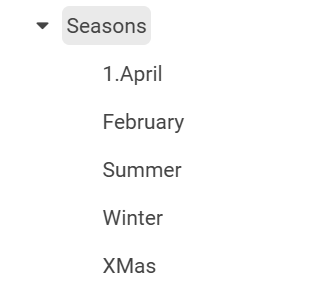
Each folder may contain the following key/values:
|
Key |
Value Description |
|---|---|
|
StartDate |
e.g. “20251223” |
|
EndDate |
e.g. “20251227” |
|
Name |
If not set the name of the folder is used. Name is used to match against Seasonal definition list value e.g. “XMas” |
|
Mode |
Auto-detection modes “Winter”, “Spring”, “Summer”, “Autumn” automatically set the StartDate and EndDate for yearly seaons |
Make sure you have the value used for “Name” also defined in the definition list “Seasonal”
Example: PlayTime
Requires at least DPE 2.16.5 or Nano 1.4.16
Entries where the PlayTime field matches one of the current play times or the PlayTime field is unset
<XmlFilter>
  <And>
    <Field Name="SoftDeleted">0</Field>

    <Or>
        <Field Name="PlayTime" IsMissing="1">0</Field>
        <Macro>CurrentPlayTimes</Macro>
    </Or>
  </And>
</XmlFilter>
Entries where the PlayTime field matches one of the current play times but not where the PlayTime field is unset
<XmlFilter>
  <And>
    <Field Name="SoftDeleted">0</Field>

    <Macro>CurrentPlayTimes</Macro>
  </And>
</XmlFilter>
Entries where the PlayTime field is set but does not match one of the current play times
<XmlFilter>
  <And>
    <Field Name="SoftDeleted">0</Field>

    <Not>
        <Or>
            <Field Name="PlayTime" IsMissing="1">0</Field>
            <Macro>CurrentPlayTimes</Macro>
        </Or>
    </Not>
  </And>
</XmlFilter>
Defining PlayTimes
For each playtime value create a folder in the Global parameter registry underneath Common|PlayTimes
Example:
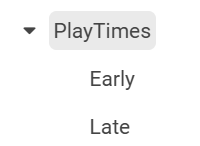
Each folder may contain the following key/values:
|
Key |
Value Description |
|---|---|
|
StartTime |
e.g. “7” |
|
EndTime |
e.g. “9:30” |
|
Name |
If not set the name of the folder is used. Name is used to match against PlayTime definition list value e.g. “Early” |
|
Mode |
Not used yet |
Make sure you have the value used for “Name” also defined in the definition list “PlayTime”
Setting Macro Behavior when current context does not match any Season or PlayTime
Requires at least DPE 2.16.5 or Nano 1.4.16
Behavior: False (default)
<Macro BehaviorOnEmpty="False">CurrentPlayTimes</Macro>
If the current context does not match any specified PlayTime.
Then behave as if the macro would not match any entry
Behavior: True
<Macro BehaviorOnEmpty="False">CurrentPlayTimes</Macro>
If the current context does not match any specified PlayTime.
Then behave as if the macro would match every entry
Behavior: Remove
<Macro BehaviorOnEmpty="False">CurrentPlayTimes</Macro>
If the current context does not match any specified PlayTime.
Then behave as if the macro would not exist.