
Audio Editors' main menu shows a sub menu Edit, which differs depending on the current editor screen.
MTS Edit Menu
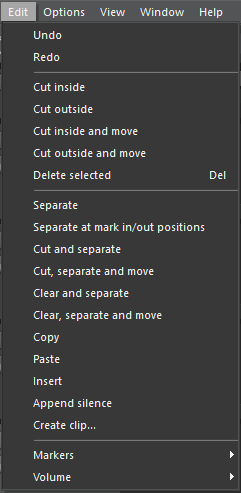
|
Item |
Description |
|---|---|
|
Undo |
Undo one step |
|
Redo |
Redo one step (only available after undo) |
|
Cut inside |
Cut off audio selection in selected tracks (makes time range silent). Cut off audio is put to clipboard. |
|
Cut outside |
Cut off audio outside selection in selected tracks. (So the selected time range remains there.) |
|
Cut inside and move |
Cut inside (see above), then shift tracks' content to fill the gap. |
|
Cut outside and move |
Cut inside and move (see above), then shift tracks' remaining content to the beginning of timeline. |
|
Delete selected |
Delete selected objects from timeline |
|
Separate |
Separates all objects of all selected tracks at the soundhead position, so two objects result from each. |
|
Separate at mark in/out positions |
Separates all objects of all selected tracks at the mark in and out positions, so three objects result from each. |
|
Cut and separate |
Cut off audio selection in selected tracks' and creates two objects from the remaining. |
|
Cut, separate and move |
Like Cut and separate, but shifts remaining audio to fill the gap. |
|
Clear and separate |
Like Cut and separate, but doesn't put audio to clipboard. |
|
Clear, separate and move |
Like Cut, separate and move, but doesn't put audio to clipboard. |
|
Copy |
Copy audio selection of all selected tracks to internal clipboard (not meaning the clipboard pane) |
|
Paste |
Paste audio from internal clipboard to soundhead position of currently selected track |
|
Insert |
Inserts silence in the selected time range of all selected tracks and separates audio objects affected by this |
|
Append silence |
Appends a "silence object" at the end of the longest track (for effect tails) |
|
Create clip... |
Creates a clip from the selected time range in the selected track, which is added to the clipboard with a user-defined title. |
ETS Edit Menu
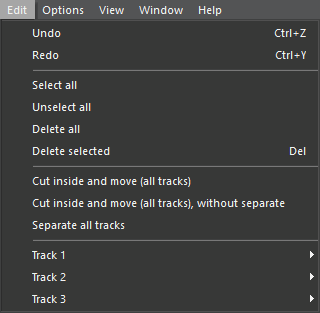
|
Item |
Description |
|---|---|
|
Undo |
Undo one step |
|
Redo |
Redo one step (only available after undo) |
|
Select all |
Select all objects of all tracks |
|
Unselect all |
Removes selection of all objects |
|
Delete all |
Clears all tracks |
|
Delete selected |
Remove selected objects from timeline |
|
Cut inside and move (all tracks) |
Cut off audio selection in all tracks' (makes time range silent), then shift tracks' content to fill the gap and creates two objects from the remaining. |
|
Cut inside and move (all tracks), without separate |
Like Cut inside and move (all tracks), but not separating objects. |
|
Track 1 |
Sub menu with actions to be applied on track 1 (see below) |
|
Track 2 |
Sub menu with actions to be applied on track 2 (see below) |
|
Track 3 |
Sub menu with actions to be applied on track 3 (see below) |
Sub menu for Track 1, Track 2 or Track 3
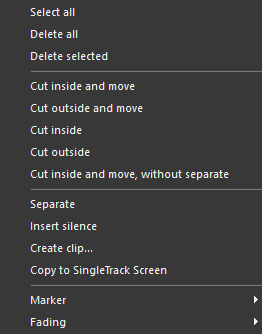
|
Item |
Description |
|---|---|
|
Select all |
Select all objects of this track |
|
Delete all |
Clears track |
|
Delete selected |
Remove selected objects of this track |
|
Cut inside and move |
Cut off selection of this track, then shift tracks' content to fill the gap and creates two objects from the remaining. |
|
Cut outside and move |
Cut inside and move (see above), then shift tracks' remaining content to the beginning of timeline. |
|
Cut inside |
Cut off audio selection in this track (makes time range silent). |
|
Cut outside |
Cut off audio outside selection in this track. (So the selected time range remains there.) |
|
Cut inside and move, without separate |
Like Cut inside and move, but without not separating objects. |
|
Separate |
Separates all objects of all selected tracks at the soundhead position, so two objects result from each. |
|
Insert silence |
Inserts silence in the selected time range of all selected tracks and separates audio objects affected by this |
|
Create clip... |
Creates a clip from the selected time range in the selected track, which is added to the clipboard with a user-defined title. |
|
Copy to SingleTrack Screen |
Copy complete track content to STS |
|
Marker |
Sub menu with options to add or delete markers |
|
Fading |
Sub menu with options to duck or remove fading |
STS Edit Menu

|
Item |
Description |
|---|---|
|
Undo |
Undo one step |
|
Redo |
Redo one step (only available after undo) |
RBS Edit Menu
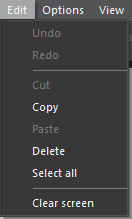
|
Item |
Description |
|---|---|
|
Undo |
Undo one step |
|
Redo |
Redo one step (only available after undo) |
|
Cut |
Cut selected text to clipboard |
|
Copy |
Copy selected text to clipboard |
|
Paste |
Paste text from clipboard |
|
Delete |
Delete selected text |
|
Select all |
Select all text |
|
Clear screen |
Deletes complete content from Reporter Box screen |