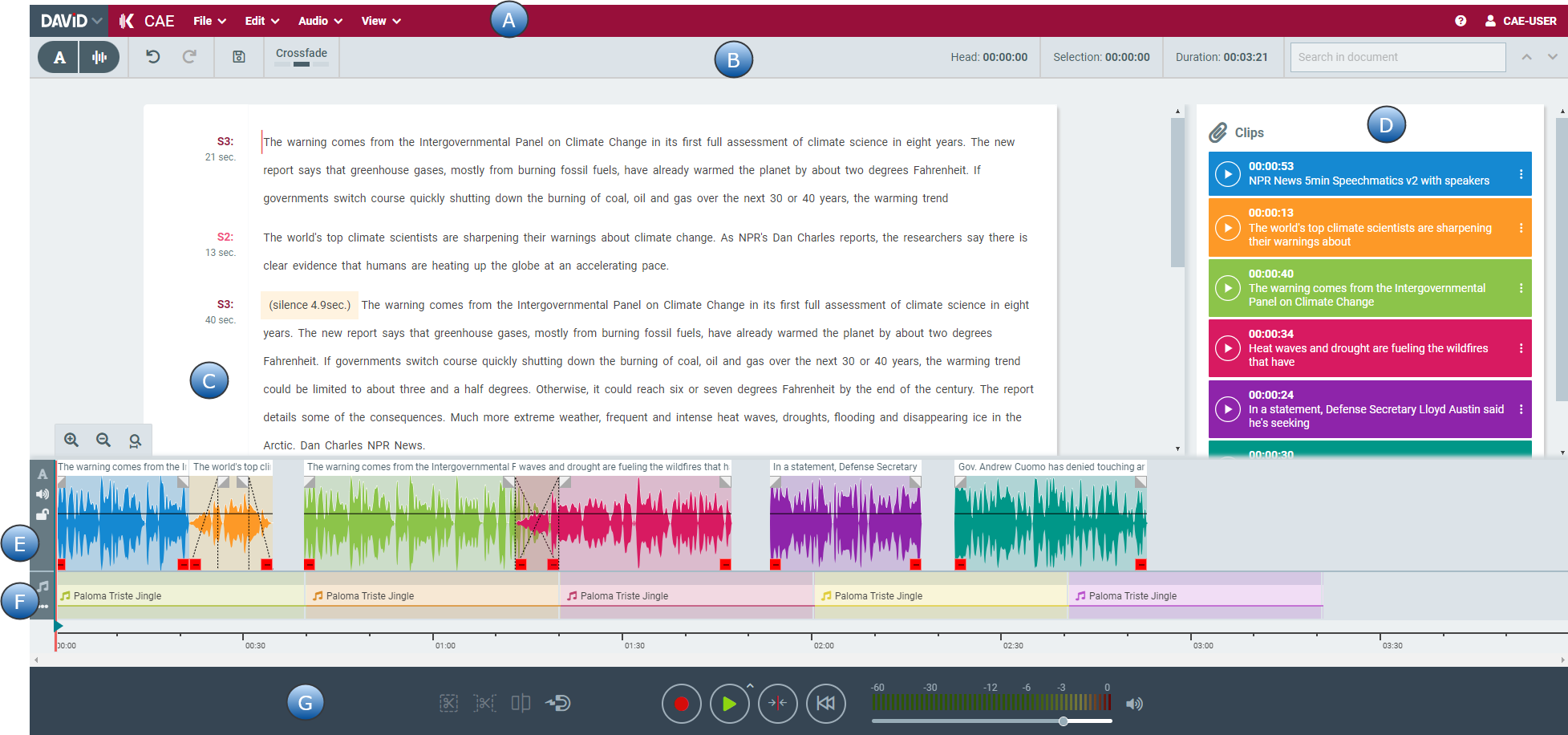
Contextual Audio Editor, in short CAE, is a web application for text-based audio editing. CAE can connect to various SpeechToText service providers and make full use of these services.
It can run within the DAVID ecosystem or as a stand-alone application. With platform independency it gives the user a flexibility to work from everywhere.
It combines working with Text, Audio, Waveform and its different working types like Text View or Waveform View. You can simply arrange your work with a Clipboard and store your created elements back to a DigaSystem database or locally.
CAE is separated in different areas. Here is an Overview:
|
Area |
Naming |
Description |
|---|---|---|
|
A |
Top Menu (Application Menu + User Menu) |
Open other DAVID web application, use the Menu to work with your Elements - File, Edit, Audio and View. Also Online Help and Info about logged in user is shown |
|
B |
Toolbar |
Switch View Mode, Undo and Save as well the different Drag Drop Modes are switchable here. Timing information and text search. |
|
C |
Text Area |
Text area to work on your transcribed text. Showing text and Speaker plus durations. |
|
D |
Clipboard |
Known from DAVID Audio Editors - to collect Clips to work with. |
|
E |
Main Track |
Showing the waveform of elements. Also possible to show the corresponding Text. |
|
F |
Music Track |
Additional track for e.g. jingles |
|
G |
Transport Area |
Audio bar to record, play etc. with enhanced Volume bar. |