
Attributes to schedule and process show structures.
Start Mode
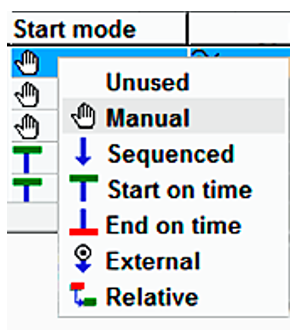
Start mode defines how an element is actually started. (behavior)
|
Unused |
Used for comment lines. |
|
Manual |
The element can be started manually at any time. |
|
Sequenced |
The send element is started automatically at the end of the previous elements, taking account of the defined crossfade parameters. A manual start ahead of time is still possible at any time. |
|
Start on time |
Element starts at the specified time. |
|
End on time |
Element stops at the specified time. |
|
External |
Element is started by an external event. In addition, other events, such as fader/key start for an external started entry. |
|
Relative |
The element starts "relative" to another, i.e. with an offset or at the same time with a specific other element (depending on the definition). |
Start Type
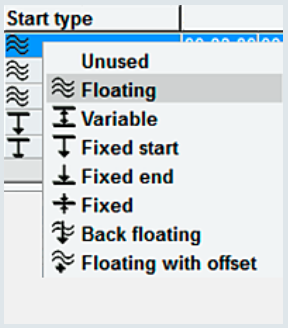
Start type defines how the element is calculated in time (display with gaps, overlaps, etc.).
|
Unused |
Used for comment lines. |
|
Floating |
The start time is calculated floating at the end of the previous element in the show list. |
|
Variable |
The start time is adapted dynamically within the specified time window. The start time remains fixed at the first value of the specified start time interval, provided a gap is calculated to the previous element. The time is adapted dynamically in case of an early start. |
|
Fixed start |
The start time is fixed at a specific start time point. Gaps and overlaps, which are calculated at the start time, are displayed accordingly. |
|
Fixed end |
The start time is fixed at a specific stop time point. A 'Start on Time’ is then executed by the TurboPlayer at the start of the start time calculated in reverse. |
|
Fixed |
The start time and the stop time are calculated as fixed parameters. |
|
Back floating |
Back floating (sequenced) elements can always be scheduled in front of "Fixed end" elements. The start time continues to be calculated in reverse. |
|
Floating with offset |
Offset for relative elements. |