
As part of Configuring Grids in DPE Web Applications, the CellTemplateContent key enables you to customize columns using templated HTML. This freedom opens the door to a near limitless combination of column design and content.
Defining this key requires knowledge about html coding
When specifying CellTemplateContent values you can reference metadata properties using the following syntax:
|
Syntax |
Description |
|---|---|
|
{Binding} |
Will be replaced by the value referenced by your default Binding for this column. A converter specified in Converter and ConverterParameter will be applied to your default Binding. |
|
{RawBinding Property} |
Will be replaced by the metadata field referenced by Property |
|
{RawBinding Property|ConverterName|ConverterParams} |
Will be replaced by the metadata fields referenced by Property and after the specified converter is applied. |
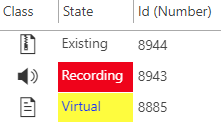
Example: Setting Background Color For Column State
|
Config Key |
Config Value |
|---|---|
|
Binding |
State |
|
CellTemplateContent |
<div style="{Binding} height:22px; padding-left:3px; padding-top:4px; ">{RawBinding State}</div> |
|
Converter |
StringToStringConverter |
|
ConverterParameter |
Existing=,Recording=background-color:red; color:white;,Virtual=background-color:yellow; color: blue; |
Screenshot:
Example: Signaling Flag Value With Color
|
Config Key |
Config Value |
|---|---|
|
Binding |
Archiving |
|
CellTemplateContent |
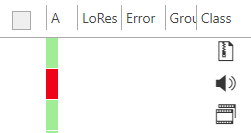
<div style="background-color:{Binding}; width:10px; height:24px;"> </div> |
|
Converter |
IntToStringConverter |
|
ConverterParameter |
lightgreen,red |
Screenshot:
Example: Using built-in font awesome characters to display a sign for flag columns
|
Config Key |
Config Value |
|---|---|
|
Binding |
NoDelete |
|
CellTemplateContent |
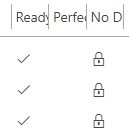
<div class="{Binding}" style="color:black; width:16px; height:16px; margin-left:5px; margin-top:6px;"> </div> |
|
Converter |
IntToStringConverter |
|
ConverterParameter |
,fa davidsystems-flag-not-deleteable |
Screenshot:
Available font awesome flags:
|
Name |
Flag |
|---|---|
|
davidsystems-beatmarker |
|
|
davidsystems-flag-archived |
|
|
davidsystems-flag-archiving |
|
|
davidsystems-flag-copyright |
|
|
davidsystems-flag-ok |
|
|
davidsystems-flag-for-archive |
|
|
davidsystems-flag-for-dearchive |
|
|
davidsystems-flag-invalid |
|
|
davidsystems-flag-invisible |
|
|
davidsystems-flag-keyframe-exist |
|
|
davidsystems-flag-loop |
|
|
davidsystems-flag-lowres-exist |
|
|
davidsystems-flag-new |
|
|
davidsystems-flag-not-deleteable |
|
|
davidsystems-flag-personal |
|
|
davidsystems-flag-ready |
|
|
davidsystems-flag-text |
|
|
davidsystems-flag-vsat |
|


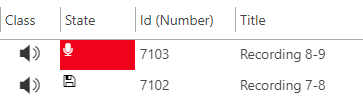
Example: Mixing font awesome characters with background color
|
Config Key |
Config Value |
|---|---|
|
Binding |
State |
|
CellTemplateContent |
|
|
Converter |
StringToStringConverter |
|
ConverterParameter |
|
Font awesome gallery: https://fontawesome.com/icons?d=gallery
Screenshot:
Example: Showing an icon in a column
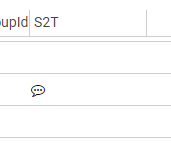
SpeechToText icon
|
Config Key |
Config Value |
|---|---|
|
Binding |
SPEECHTOTEXT_PLAIN |
|
CellTemplateContent |
<div class="{Binding}" style="color:black;"> </div> |
|
Converter |
IntToStringConverter |
|
ConverterParameter |
,$default$=fa fa-commenting-o |
Screenshot:
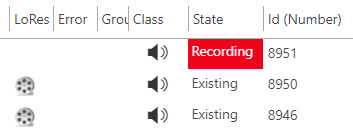
Lores icon
|
Config Key |
Config Value |
|---|---|
|
Binding |
LowResExists |
|
CellTemplateContent |
<div style="{Binding} margin-top:5px; margin-left:5px; width:16px; height:16px;"> </div> |
|
Converter |
IntToStringConverter |
|
ConverterParameter |
,background-image: url(import/dpe-html5-framework/core/resources/images/video.png); background-size: 100% auto; |
You can also specify an external URL.
Screenshot:
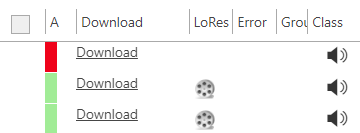
Example: Download link to main medium
|
Config Key |
Config Value |
|---|---|
|
Binding |
Dummy |
|
CellTemplateContent |
<a href="/DpeWebApplication/DownloadMedium.ashx?{RawBinding FullEntryId}">Download</a> |
Screenshot:
Example: SD/HD Video Format Column
|
Config Key |
Config Value |
|
|---|---|---|
|
Binding |
hiMedium.Format |
|
|
Converter |
FormatToSdHdConverter |
|
|
ConverterParameter |
Default (Empty) |
'SD', 'HD' or ' ' for HD video, SD video or other video |
|
|
,SD, |
Labels only SD videos |
|
|
,background-image: url(http://vwwv.image.com/img.png); background-size: 100% auto;,background-image: url(audio.png); background-size: 100% auto; |
Displays an image depending on the video quality. |