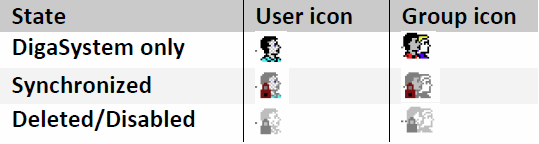
During Synchronizing with AD the state of a user in AD is marked with correlated states in DigaSystem:
|
Status |
Description |
|---|---|
|
Enabled |
AD users and groups can be disabled |
|
Deleted |
Users and groups can be deleted from AD, but they shall only be marked as deleted in the Management Servicessection Users & Groups. |
|
Synchronized |
Users and groups in the DigaSystem can be synchronized, but can also exit in the DigaSystem only. Both types of users and groups coexist and can be mixed with each other. |
|
Synchronization ID |
The DigaSystem stores the unique ID of the AD object |
States can be viewed in the property dialog of the DPE Management Services section Users & Groups or the DigaSystem Admininstrator:
In the section Users & Groups of the DPE Management Services, a chain icon will be shown to identify ADSync-ed users.
|
Icon |
Meaning |
|---|---|
|
|
The user is Synced / The user is Synced and Disabled |
|
|
The group is Synced / The group is Synced and Disabled |
|
|
The group / user is Synced and Deleted (A group or user cannot be Disabled AND Deleted) |


Such users cannot be deleted in Management Services, therefore they will not be listed in the Delete User dialog.
In DigaSystem Administrator:
States are also represented by different icons in the user and group tree.