
On Windows, we recommend installing the Hosting Bundle, which includes the .NET Runtime and IIS support, see Prerequisites
Copy files for DpeNanoServices
-
Create a folder DpeNanoServices inside the inetpub folder
-
Copy DpeNanoServices files to this folder
Make sure DpeNanoServices runs from command-line
See Step-by-Step Tutorial (Windows)
Add a new web site for DpeNanoServices
-
Use IIS Manager to add a new site ( TODO : more details, screenshots)
-
Adapt the application pool for DpeNanoServices
-
Open IIS Manager
-
Select DpeNanoServices application pool
-
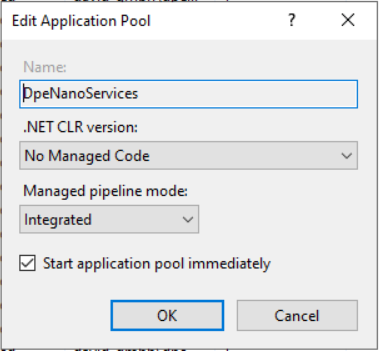
Open “Basic Settings…” of application pool and set .Net CLR version to “No Managed Code”
-
Open “Advanced Settings…”
-
Change the “Application Pool Identity” to credentials that have permssions to acess PAR files (and write log files if needed)
Create or adapt web.config
Example web.config
<?xml version="1.0" encoding="utf-8"?>
<configuration>
  <location path="." inheritInChildApplications="false">
    <system.webServer>
      <handlers>
        <add name="aspNetCore" path="*" verb="*" modules="AspNetCoreModuleV2" resourceType="Unspecified" />
      </handlers>
      <aspNetCore processPath="dotnet" arguments=".\DpeNanoServices.dll" stdoutLogEnabled="false" stdoutLogFile=".\logs\stdout" hostingModel="inprocess" >
		  <environmentVariables>
			<environmentVariable name="ASPNETCORE_ENVIRONMENT" value="Production" />
			<environmentVariable name="DpeLogging__UseFileLogger" value="true" />
		  </environmentVariables>
	  </aspNetCore>
    </system.webServer>
  </location>
</configuration>