
The MAM Adapter Service replaces ROAD v1’s upload workflow to MAM systems (for example, DPE or other third-party MAMs). In ROAD v2, all MAM uploads use this service.
MamService is a cross-platform service that acts as a bridge between a media recording/upload workflow and one or more Media Asset Management (MAM) systems (such as DPE). Its job is to watch for new recordings, then stream the media and its metadata into every configured MAM system automatically.
High-level feature set of the MAM Adapter Service
-
Using a .NET Core plugin model, third-party MAM systems can integrate with ROAD for recordings.
-
Supports cross-platform deployment on Linux, Windows, and macOS based on the current .NET framework.
-
The service monitors a configured folder for journal files to track upload progress for recordings.
-
The audio uploader supports read-while-write uploads during recording.
-
The first provided plugin is for DPE (DpeMamPlugin), it uploads files via DPE services and direct file access. The direct file access provides functionality similar to ROAD v1. To update metadata, a DPE backend is required.
What it does, step by step
-
Watches a folder for journal files (
.jnl). Each journal file describes one in-progress media recording/upload — it's an append-only log that a recording system writes to as the recording proceeds. -
Tails each journal line by line. Every line is a JSON command describing what's happening with that upload: create the file, here's another chunk of media, update the metadata, heartbeat, finish, cancel, etc.
-
Drives MAM plugins from those commands. Plugins are loaded at runtime from DLLs (not compiled in), so new MAM systems can be added without changing the service. Each command is translated into the matching plugin call —
createFile→ start upload,updateFile→ stream a media chunk,finish→ finalize — and every loaded plugin receives every upload. -
Runs uploads independently and concurrently. Each journal gets its own observer + plugin set, so many recordings can be ingested at once, while commands within a single upload are always processed strictly in order.
-
Guards against stalls. A per-upload heartbeat watchdog cancels an upload across all plugins if the journal goes silent longer than the configured timeout.
-
Cleans up when done. On successful finish it optionally archives the media + journal (zipped, kept for N days) and deletes the source files; a daily task prunes the archive folder.
Key design characteristics
-
Plugin architecture — the service knows nothing about any specific MAM system; all MAM-specific logic lives in plugins (e.g.
DpeMamPlugin). Plugins even parse their own config section. -
Config-driven — folders, timeouts, retention, and per-plugin settings all come from
appsettings.json(with env-var/command-line overrides). -
Log correlation — every log line for one upload is tagged with a context id so all activity for a single recording can be traced together. For ROAD this context id usually is the related job id.
-
Robust per-upload error handling — a failure in one upload (plugin exception, timeout) cancels only that upload; other in-flight uploads are unaffected.
Visualization of the MAM Adapter Service
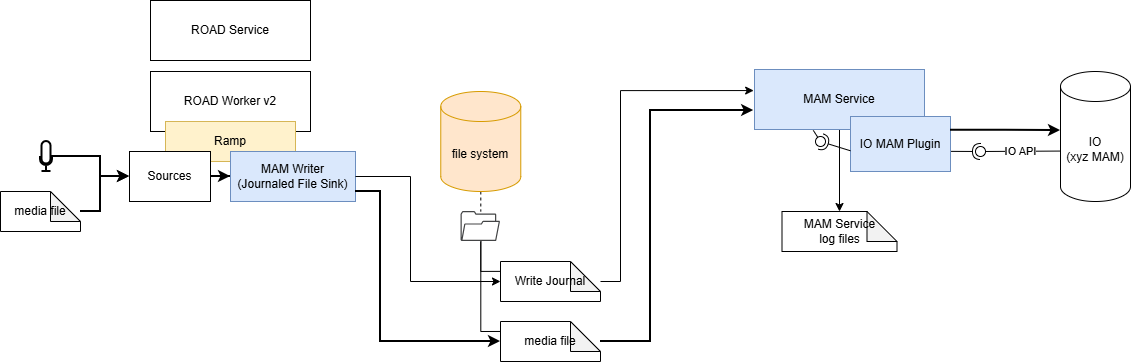
Glossary
-
Ramp (Realtime Audio Media Processing) is ROAD v2’s new audio engine component; it uses GStreamer technology for audio processing
-
MAM Writer is the audio creating party’s component which writes audio and journal files to a configured watch folder. Currently there is a MAM Writer as part of Ramp; later this will come also for ROAD v1.
-
MAM Service monitors the filesystem for new or updated journal files and triggers the IO MAM Plugin to upload them to third-party MAM systems such as the DigaSystem DPE.
-
IO MAM Plugin is the vendor-specific .NET plugin that connects to MAM systems (for example, DPE for DigaSystem integrations).
-
Journal File is a line-by-line control file for upload progress that lists operation commands such as
createFile,updateFile,updateMetadata,finalize, andfinish. The journal file also contains metadata and filenames for upload.