Work in progress
Switching a Track into Edit Mode (TODO)
Setting Fade Points (TODO)
Editing the Stereo Balance (TODO)
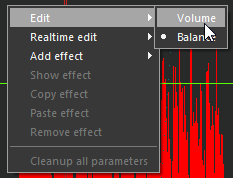
Switching Volume and Balance Editing Modes
To toggle between Volume and Balance Editing modes,
-
Turn on Edit Mode for the respective track
-
Ctrl+Right click anywhere within the waveform, or into the free headroom above the waveform. (Ctrl+Right click means: Hold down the Ctrl key while you press and release the right mouse button.)
-
In the menu that pops up, point to "Edit", then click "Volume" or "Balance".