
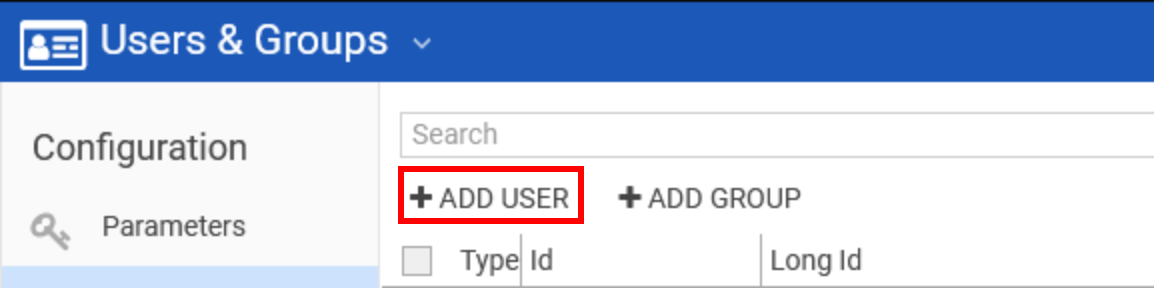
Click on the "ADD USER" to add a new user.
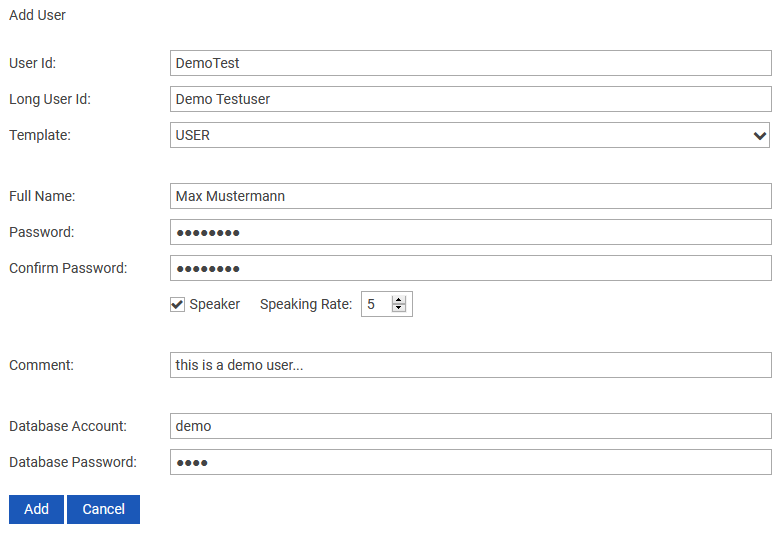
The following window appears:
|
Field |
Description |
|---|---|
|
User Id |
Name of the new user and primary login name that can be 8 characters long. This cannot exceed 8 characters. |
|
Long User Id |
It is an alternative that can be used to log in. It is not limited to 8 characters. |
|
Template |
In this drop down field all existing DigaSystem users are listed, including the ADMIN. One of those can be chosen to use it as a template and inherit its settings. |
|
Full Name |
Enter the full name of the user here. This is to clearly identify the person behind the user account. |
|
Password |
Define the user account password in this field. |
|
Confirm Password |
Confirm the password once again. |
|
Speaker |
If this account will be used for recordings activate this check box to define the speaking rate. |
|
Speaking Rate |
Define the talking speed for recordings. This setting is used to precalculate the length of a recording in the DigaSystem editors. |
|
Comment |
Optionally some additional information about the user. |
|
Database Account |
Account name to authenticate this user for accessing SQL databases. |
|
Database Password |
Password of the account to authenticate this user for accessing SQL databases. |
Click "Add" to create a new user.