
Requires a license WorkflowSystem (previously WorkflowAdmin) and the action right DpeAdmin.OpenSafMonitor.
Open the Web Admin and select SAF Monitor to start monitoring and managing SAF modules.
The SAF Monitor enables you to:
-
Search for modules with the dedicated search bar;
-
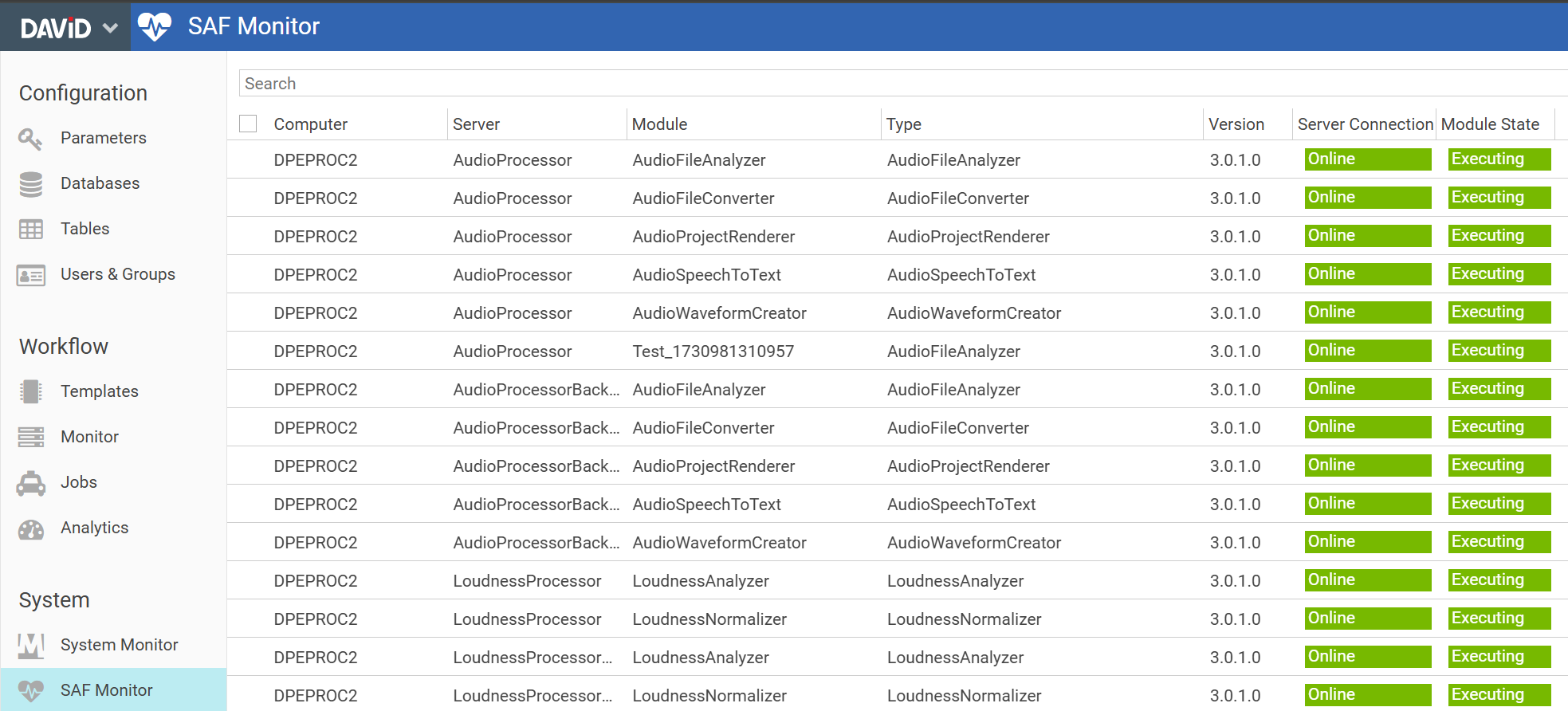
Check, for example, the Module State, the Type and the Version of the modules (check the screenshot below);
-
Start and stop modules by selecting modules in the main area and clicking the top menu button Start or Stop. Stopping a module will ask the module to finish its current work and stop “gracefully”;


-
Add new modules or delete existing modules
(requires DPE Admin >= 3.1.35, Nano >= 1.2.33 or DPE Server backend >= 2.14.19 and v3 SAF Modules); -
Restart a SAF Server
(requires DPE Admin >= 3.1.35, Nano >= 1.2.33 or DPE Server backend >= 2.14.19 and v3 SAF Modules); -
Reconnect your SAF Service (in Nano or DPE) to all SAF Servers
(requires DPE Admin >= 3.1.35, Nano >= 1.2.33 or DPE Server backend >= 2.14.19 and v3 SAF Modules); -
See the details and the configuration of modules by selecting them and clicking the top menu button Details (check the subpage for more info).