
Ensure that all https://davidsystems.atlassian.net/wiki/x/KIA3Nw are met before proceeding.
Installation scenarios
The Rundown Broker Setup folder contains several files for different installation scenarios.
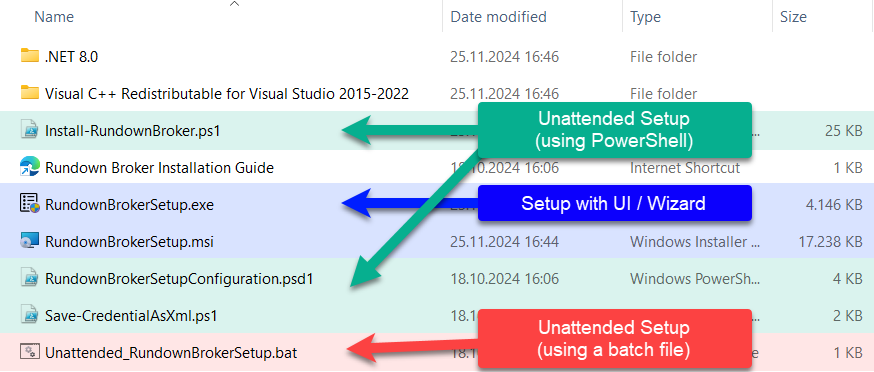
Choose your installation scenario in the following table and continue with the appropriate link in the column Next Up
|
Installation Scenario |
Installed on |
User/Environment |
Notes |
Technology |
Next Up |
|---|---|---|---|---|---|
|
First-time installation or upgrade installation[1] with UI |
Local computer |
New user, Admin, Tester, CXG, Sales, Demos, Presentations |
Benefits are
In an upgrade installation all configuration settings from the previous installation are preserved (default), but can be changed. |
Windows MSI Installer with UI/Wizard |
Rundown Broker installation using a UI Wizard (MSI installer) |
|
Upgrade installation[1] without UI (unattended installation[2]) |
Local computer |
Admin, Tester, CXG, Sales, Demos, Presentations |
All configuration settings from the previous installation are preserved. |
Command line |
Unattended Rundown Broker upgrade installation on a local computer |
|
Unattended[2] first-time installation from installation folder |
Local computer |
Admin, Enterprise |
Installation parameters must be known in advance e.g., computer names, DPE URL, …. |
Command line using a batch file |
Unattended Rundown Broker installation using a batch file on a local computer |
|
Unattended[2] remote installation |
Local computer and/or remote computers |
Admin, Enterprise |
Installation parameters must be known in advance. PowerShell remoting is only used when installing on a remote computer. |
PowerShell (remoting) Script |
Unattended Rundown Broker installation on multiple computers using PowerShell remoting |
Definitions
[1] An Upgrade installation refers to an installation on a computer where an older version of Rundown Broker is already installed and operational.
[2] An Unattended Installation refers to installing the software automatically without requiring any manual intervention or user input during the process.