
Workflow System enables you to run business activity in the backend. Users and front-ends benefit from
-
Non-blocking behavior: the user can continue working after triggering a workflow
-
Scalability and redundancy: job processor farms can load-balance the work and compensate failures
-
Customizability: functionality is not hard-coded into applications but can be easily adapted
-
Monitoring: the state and progress can be easily tracked
-
Reusability: functionality has to be implemented only once and can be reused from any client, also 3rd party
Workflow Basics
The DPE Workflow System is based on the Microsoft Workflow Foundation library.
A workflow template is a recipe containing a sequence of operations. It is used as a template for workflow instances.
A workflow activity is a single operation in a workflow template. Some activities delegate their work to jobs.
A job is an operation executed through one of optionally many job processors (optionally on different machines). Using jobs is the way to scale workflow operations.
A workflow instance is a living copy of a workflow template. It has a status (e.g. Scheduled, Running, Finished, Failed) and a progress.
Component Overview
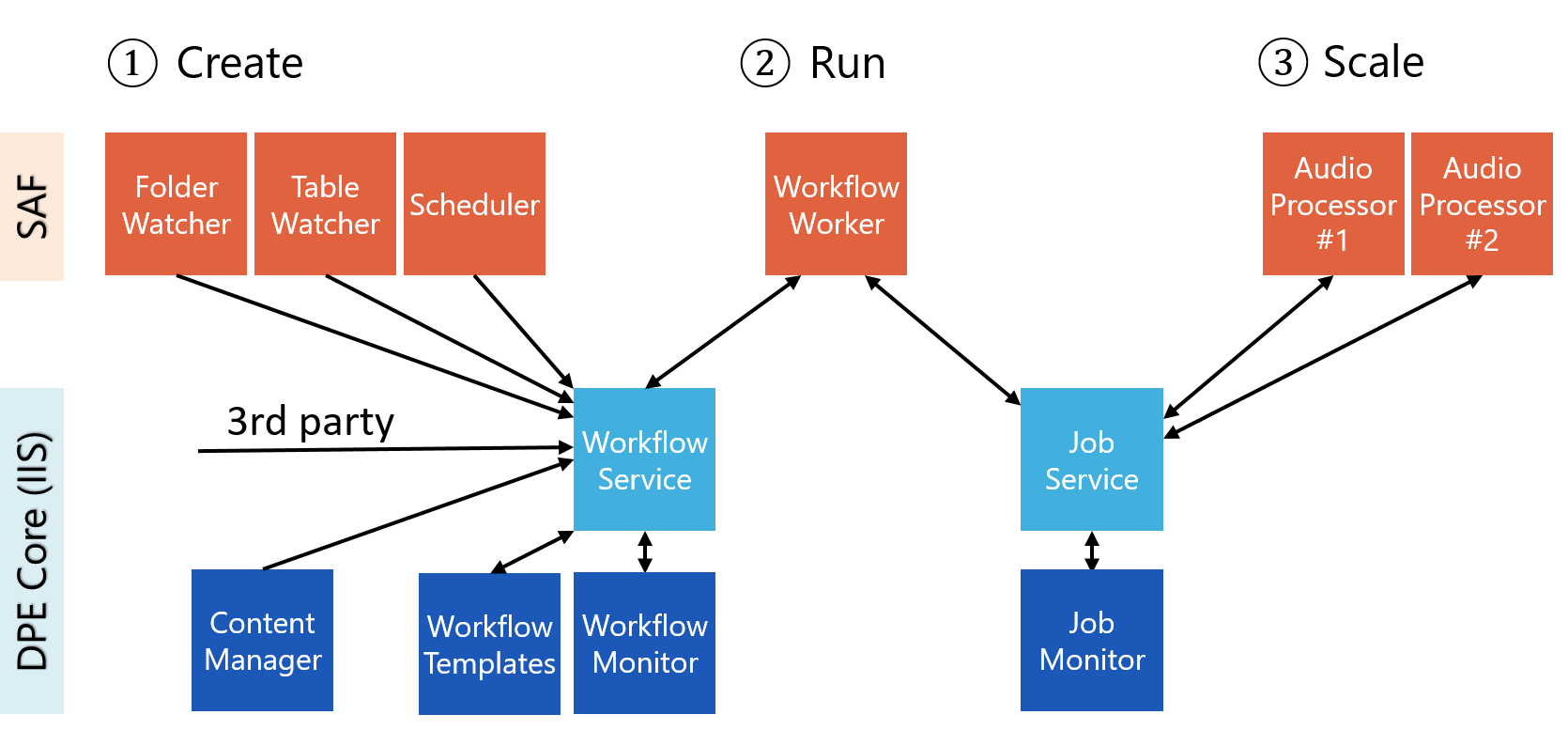
|
Component |
Description |
Related Topics |
|---|---|---|
|
Workflow Monitor |
Workflow Monitor web page can be used to monitor the status and progress of workflows. It can also be used to cancel workflows or to change their priority. |
|
|
Job Monitor |
Job Monitor web page can be used to monitor the status and progress of jobs. |
Monitoring Jobs |
|
Workflow Templates |
Workflow Templates web page can be used to import and export workflow templates. |
Importing Workflow Templates |
|
Workflow Service |
Workflow Service is part of DPE Services and offers a programming interface (API) to manage the workflow database. A user has no direct contact to it. |
|
|
Job Service |
Job Service is part of DPE Services and offers a programming interface (API) to manage the job database. A user has no direct contact to it. |
|
|
Workflow Worker |
Workflow Worker is the component that executes workflows. It is part of the Workflow Server application. |
Configuring Workflow Worker |
|
Workflow Scheduler |
Workflow Scheduler is the component that can instantiate workflows based on a schedule. It is part of the Workflow Server application. |
Configuring Workflow Scheduler |
|
Workflow Table Watcher |
Workflow Table Watcher is the component that can instantiate workflows based on changes in a DigaSystem table. It is part of the Workflow Server application. |
Configuring Workflow Table Watcher |
|
Workflow Folder Watcher |
Workflow Folder Watcher is the component that can instantiate workflows based on changes in a file system folder. It is part of the Workflow Server application. |
Configuring Workflow Folder Watcher |
|
Content Manager |
Some user actions in the Content Manager web page instantiate workflows, e.g. dragging an entry from one table to another instantiates a copy workflow. |
Content Manager |
|
3rd Party Workflow Triggers |
3rd party applications can instantiate workflows using the Workflow Service API. |
|
|
Job Processors |
Job processor applications are executing jobs. |
Installing a Job Processor
, Configuring Job Processors |