
For adding or editing parameter values a Code Editor is provided.
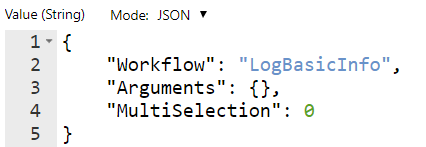
It offers the following features for various text formats (JSON, XML, HTML/Handlebars):
-
Line numbers
-
Syntax Highlighting
-
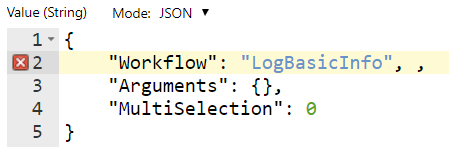
Syntax Validation
-
Find and Replace (Ctrl-F and Ctrl-H)
-
Bracket Matching
-
Folding
-
Theming
Example:
Example with syntax error:
Options
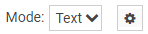
To configure the editor click on the cog wheel button at the top right :
This will open a small dialog that will let you select a theme and change the font and tab size.
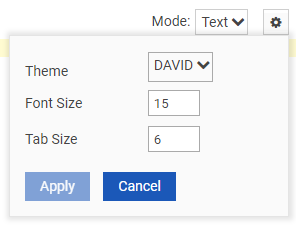
Configuration changes are stored for the logged on user under Admin\Parameters\Editor.
Keyboard Shortcuts
Line Operations
|
Windows/Linux |
Mac |
Action |
|---|---|---|
|
Ctrl-D |
Command-D |
Remove line |
|
Alt-Shift-Down |
Command-Option-Down |
Copy lines down |
|
Alt-Shift-Up |
Command-Option-Up |
Copy lines up |
|
Alt-Down |
Option-Down |
Move lines down |
|
Alt-Up |
Option-Up |
Move lines up |
|
Alt-Delete |
Ctrl-K |
Remove to line end |
|
Alt-Backspace |
Command-Backspace |
Remove to linestart |
|
Ctrl-Backspace |
Option-Backspace,
|
Remove word left |
|
Ctrl-Delete |
Option-Delete |
Remove word right |
|
--- |
Ctrl-O |
Split line |
Selection
|
Windows/Linux |
Mac |
Action |
|---|---|---|
|
Ctrl-A |
Command-A |
Select all |
|
Shift-Left |
Shift-Left |
Select left |
|
Shift-Right |
Shift-Right |
Select right |
|
Ctrl-Shift-Left |
Option-Shift-Left |
Select word left |
|
Ctrl-Shift-Right |
Option-Shift-Right |
Select word right |
|
Shift-Home |
Shift-Home |
Select line start |
|
Shift-End |
Shift-End |
Select line end |
|
Alt-Shift-Right |
Command-Shift-Right |
Select to line end |
|
Alt-Shift-Left |
Command-Shift-Left |
Select to line start |
|
Shift-Up |
Shift-Up |
Select up |
|
Shift-Down |
Shift-Down |
Select down |
|
Shift-PageUp |
Shift-PageUp |
Select page up |
|
Shift-PageDown |
Shift-PageDown |
Select page down |
|
Ctrl-Shift-Home |
Command-Shift-Up |
Select to start |
|
Ctrl-Shift-End |
Command-Shift-Down |
Select to end |
|
Ctrl-Shift-D |
Command-Shift-D |
Duplicate selection |
|
Ctrl-Shift-P |
--- |
Select to matching bracket |
Go to
|
Windows/Linux |
Mac |
Action |
|---|---|---|
|
Left |
Left, Ctrl-B |
Go to left |
|
Right |
Right, Ctrl-F |
Go to right |
|
Ctrl-Left |
Option-Left |
Go to word left |
|
Ctrl-Right |
Option-Right |
Go to word right |
|
Up |
Up, Ctrl-P |
Go line up |
|
Down |
Down, Ctrl-N |
Go line down |
|
Alt-Left, Home |
Command-Left, Home,
|
Go to line start |
|
Alt-Right, End |
Command-Right, End,
|
Go to line end |
|
PageUp |
Option-PageUp |
Go to page up |
|
PageDown |
Option-PageDown,
|
Go to page down |
|
Ctrl-Home |
Command-Home,
|
Go to start |
|
Ctrl-End |
Command-End,
|
Go to end |
|
Ctrl-L |
Command-L |
Go to line |
|
Ctrl-Down |
Command-Down |
Scroll line down |
|
Ctrl-Up |
--- |
Scroll line up |
|
Ctrl-P |
--- |
Go to matching bracket |
|
--- |
Option-PageDown |
Scroll page down |
|
--- |
Option-PageUp |
Scroll page up |
Find/Replace
|
Windows/Linux |
Mac |
Action |
|---|---|---|
|
Ctrl-F |
Command-F |
Find |
|
Ctrl-H |
Command-Option-F |
Replace |
|
Ctrl-K |
Command-G |
Find next |
|
Ctrl-Shift-K |
Command-Shift-G |
Find previous |
Folding
|
Windows/Linux |
Mac |
Action |
|---|---|---|
|
Alt-L,
|
Command-Option-L,
|
Fold selection |
|
Alt-Shift-L,
|
Command-Option-Shift-L,
|
Unfold |
|
Alt-0 |
Command-Option-0 |
Fold all |
|
Alt-Shift-0 |
Command-Option-Shift-0 |
Unfold all |
Other
|
Windows/Linux |
Mac |
Action |
|---|---|---|
|
Tab |
Tab |
Indent |
|
Shift-Tab |
Shift-Tab |
Outdent |
|
Ctrl-Z |
Command-Z |
Undo |
|
Ctrl-Shift-Z, Ctrl-Y |
Command-Shift-Z,
|
Redo |
|
Ctrl-, |
Command-, |
Show the settings menu |
|
Ctrl-/ |
Command-/ |
Toggle comment (English keyboard) |
|
Ctrl-# |
Command-# |
Toggle comment (German keyboard) |
|
Ctrl-Shift-U |
Ctrl-Shift-U |
Change to lower case |
|
Ctrl-U |
Ctrl-U |
Change to upper case |
|
Insert |
Insert |
Overwrite |
|
Delete |
--- |
Delete |