
An administrator can configure DBM so that it displays a web page in the lower right pane. Since version 5.9.8238.0, DBM uses an Edge based browser view so that modern web features are fully supported. The following parameters must be defined:
|
Name |
Value |
Example |
Remarks |
|---|---|---|---|
|
DBMBrowserScript |
Defines the URL of the starting web page |
https://google.com/ |
LOCAL overrides GLOBAL |
|
WebBrowserArtifactsFolder new since version 5.9.8238.0 |
Defines the local directory where the browser stores persistent data like cookies |
%APPDATA%\DBM |
Variables from the Windows environment are resolved when enclosed in percent signs LOCAL overrides GLOBAL; USER overrides LOCAL and GLOBAL |
|
ForceShowBrowser |
Defines whether the web browser is displayed when DBM starts |
TRUE |
By default, the web browser is not displayed. |
To actually display the web page, click the "View browser" button in the toolbar, or select View → Browser from the main menu.
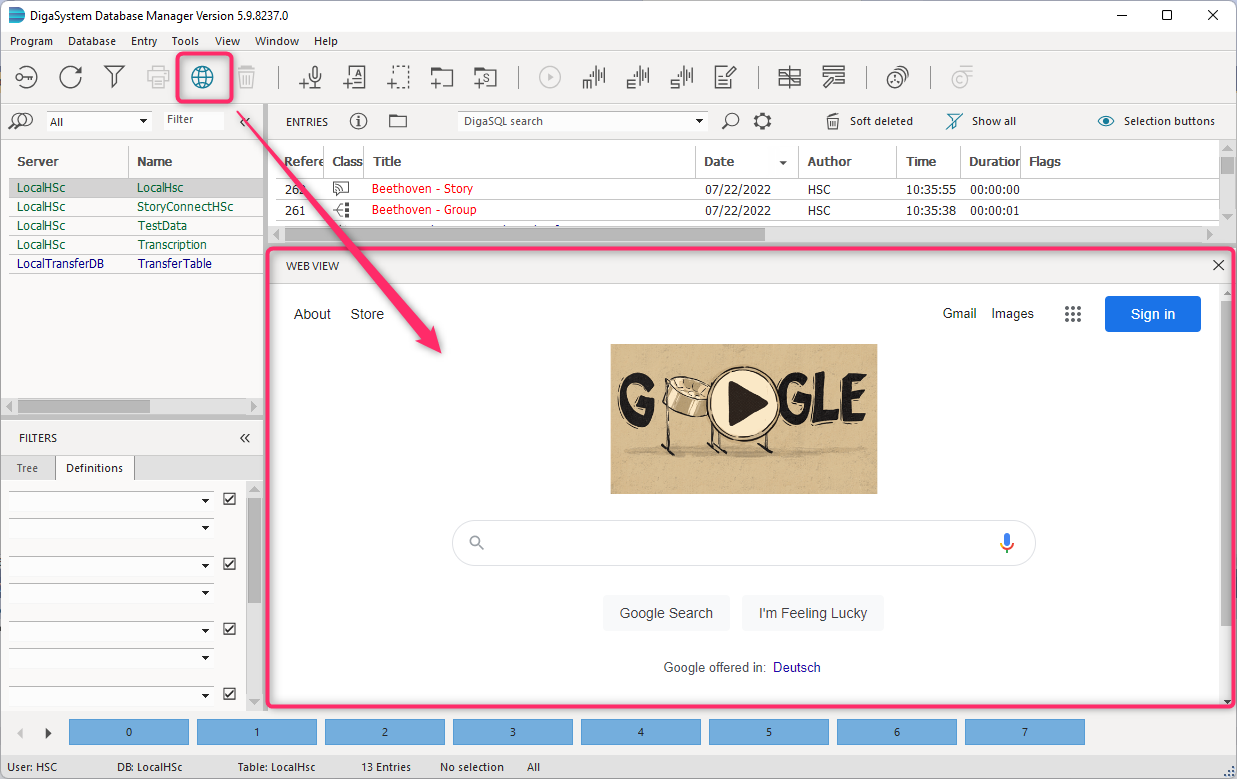
if the ForceShowBrowser parameter is defined a 1 or TRUE, then the web browser is displayed every time DBM starts. Otherwise, the lower right pane displays whatever had been displayed when DBM was closed down most recently.