
This dialog provides some low-level information about a table in the database. It ca be invoked from from main menu → Database → Table info, or from the context menu of a table in the list of tables.
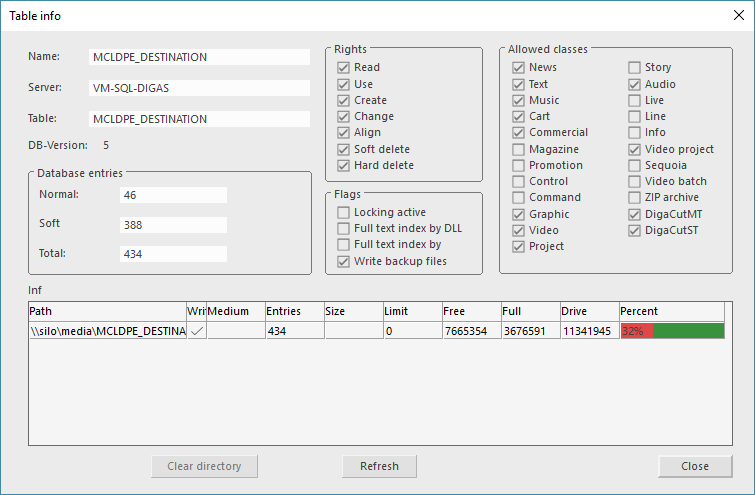
Left column
|
Name |
Name of database table |
|
Server |
Database this table is part of |
|
Table |
Physical table name (can differ from the "Name") |
|
DB-Version |
Displays the database version |
|
Database entries |
Normal
|
|
|
Softdeleted
|
|
|
Total
|
|
Rights |
Shows the rights the currently logged in user has in this table |
|
Flags |
Locking active |
|
|
Fulltext index by DLL |
|
|
Fulltext index by service |
|
|
Write backupfiles |
|
Allowed classes |
All entry classes that are allowed in this table are check marked. If an item is dragged onto a table of a class that is not permitted, there will be a blocker cursor displayed to explain the conflict. |
Information about the corresponding media directories (size in MB)
|
Path |
Shows the path where the media data of this table's entries are stored |
|
Writeable |
A checkmark confirms writing access to the media path on Windows level |
|
Medium |
In case of multiple table folders the medium is shown |
|
Entries |
Number of entries in this table (excluding the soft deleted entries) |
|
Size |
Size of all table entries (in MB) |
|
Limit |
Maximum size of an Archive medium |
|
Free |
Shows the free space on the hard drive of the media path (in MB) |
|
Full |
Shows the used space on the hard drive of the media path (in MB) |
|
Drive |
Shows the total space on the hard drive of the media path (in MB) |
|
Percent |
A visual display of the available space on the hard drive of the media path |
Dialog Buttons
|
Clear directory |
Directory cleanup |
|
Refresh |
Refresh the status of this dialog |