
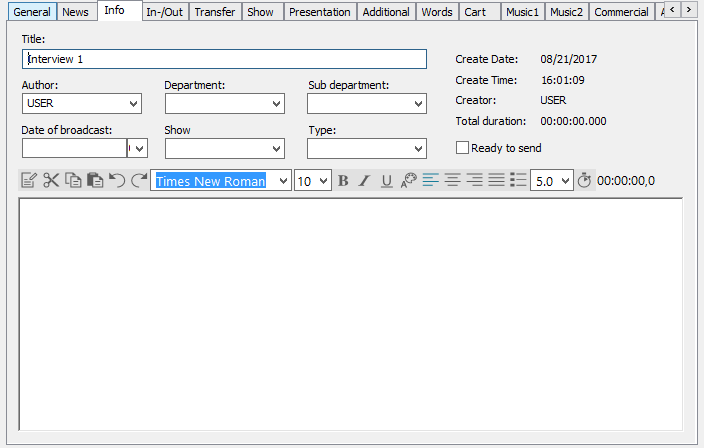
The Info tab offers journalist relevant metadata and a text field, whose content is saved in an additional text file (.RTF). This file is named after the corresponding entry in the file system.
|
Title |
Shows the title of the database entry (not the file name). |
|
Author |
Input/selection field. The author's name is automatically entered (login name). The author of an entry can be changed either from out of the list or newly entered. |
|
Department |
Selection field. The department for this entry can be selected from a predefined list. |
|
Sub department |
Selection field. The sub-department for an entry can be selected from a list of those available for the selected department. A sub-department can only be assigned after a department has been assigned. |
|
Date of broadcast |
Select the broadcast date on the drop down calendar. |
|
Show |
Entry field. The respective transmission can be entered here for which the entry is destined. |
|
Type |
This field was used to describe the music type (before the Department fields were introduced) and can now be used for any type of information. |
|
Ready to send |
This checkbox marks this entry to be ready for broadcasting (also see 5.4 Entry Flags) |
|
Creation data |
System field. The exact date and time of the entry's creation as well as its length and creator is displayed here. |